Short answer: with an 8K context and Q4_K_M quantization, an 8GB card tops out around 8B, a 12GB card handles 14B, and a 24GB card gets you to 32B. Push the context longer and each of those limits drops a size.
Those cutoffs aren’t rules of thumb pulled from a forum thread. They fall out of one sum: VRAM needed = weights + KV cache + headroom. You can do it yourself with four numbers from a model’s config.json and model card. The examples below use real configs from the Qwen3 family, since it comes in a nice spread of sizes.
Weights: parameters times bits
The weights are the biggest chunk. Multiply the parameter count by how many bits each one takes. llama.cpp’s quantize README has measured bits per weight for Llama 3.1 8B at each level: F16 is 16.0, Q8_0 is 8.50, Q6_K is 6.56, Q5_K_M is 5.70, and Q4_K_M is 4.89.
Turn that into bytes and you get, per billion parameters, about 2.0GB at F16, 1.06GB at Q8_0, 0.82GB at Q6_K and 0.61GB at Q4_K_M. So a quick way to size a Q4_K_M file is “B × 0.6GB.” It checks out: the README lists Llama 3.1 8B at 4.58GiB in Q4_K_M, and plugging 8.03B into the same math gives 4.58GiB.
| Model (params) | F16 | Q8_0 | Q6_K | Q4_K_M |
|---|---|---|---|---|
| Qwen3-4B (4.0B) | 7.5 | 4.0 | 3.1 | 2.3 |
| Qwen3-8B (8.2B) | 15.3 | 8.1 | 6.3 | 4.7 |
| Qwen3-14B (14.8B) | 27.6 | 14.7 | 11.3 | 8.4 |
| Qwen3-30B-A3B (30.5B) | 56.8 | 30.2 | 23.3 | 17.4 |
| Qwen3-32B (32.8B) | 61.1 | 32.5 | 25.1 | 18.7 |
GiB. Parameter counts from each model card. Calculation: QuestBrief
One caveat. Each quant type keeps certain layers at higher precision, so the real bits per weight shift a little with architecture. The table uses the Llama 3.1 8B numbers as an estimate. If the download page lists the actual GGUF file size, trust that instead.
KV cache: the part that ignores model size
The KV cache is where the model keeps what it has already read, so it grows with your context. Here’s the formula:
KV cache per token = 2 × layers × KV heads × head dim × 2 bytes (F16)
Look for num_hidden_layers, num_key_value_heads and head_dim in config.json. Qwen3-8B has 36 layers, 8 KV heads and a head dim of 128, so that’s 144KiB per token, or 1.1GiB for 8K tokens.
There’s a classic mistake here. A lot of calculators work out head dim as hidden_size ÷ num_attention_heads. That happens to work for Llama 3 8B (4,096 ÷ 32 = 128), but Qwen3-32B has a hidden size of 5,120 and 64 attention heads, which gives you 80. Its config.json actually says head_dim is 128. Use 80 and you’ll underestimate the KV cache by 37.5%. If head_dim is listed, use it.
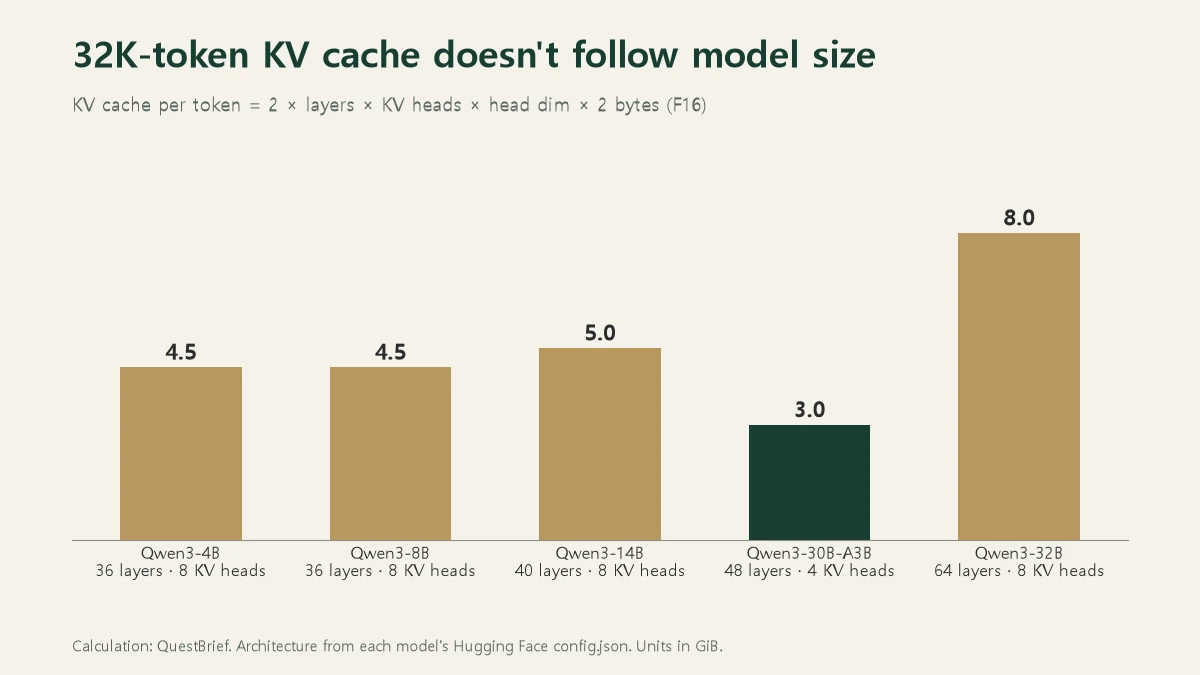
Chart: QuestBrief calculation
The KV cache doesn’t line up with model size at all. The 4B and 8B share the same layer and KV head counts, so their caches are identical. The 14B is only 11% bigger. The 32B jumps because it has 64 layers. The surprise is the 30B-A3B: 30 billion parameters, but only 4 KV heads, so a 32K context costs just 3GiB. That’s less than the 4B.
Headroom: llama.cpp keeps 1GiB free
The last chunk covers compute buffers and other overhead. It varies by model and settings, so there’s no clean formula. There is a sensible default to borrow, though. The llama.cpp server README shows --fit is on by default and adjusts any settings you didn’t specify to fit in device memory, leaving a 1,024MiB margin per device. We added the same 1GiB to every estimate here.
What fits on your card
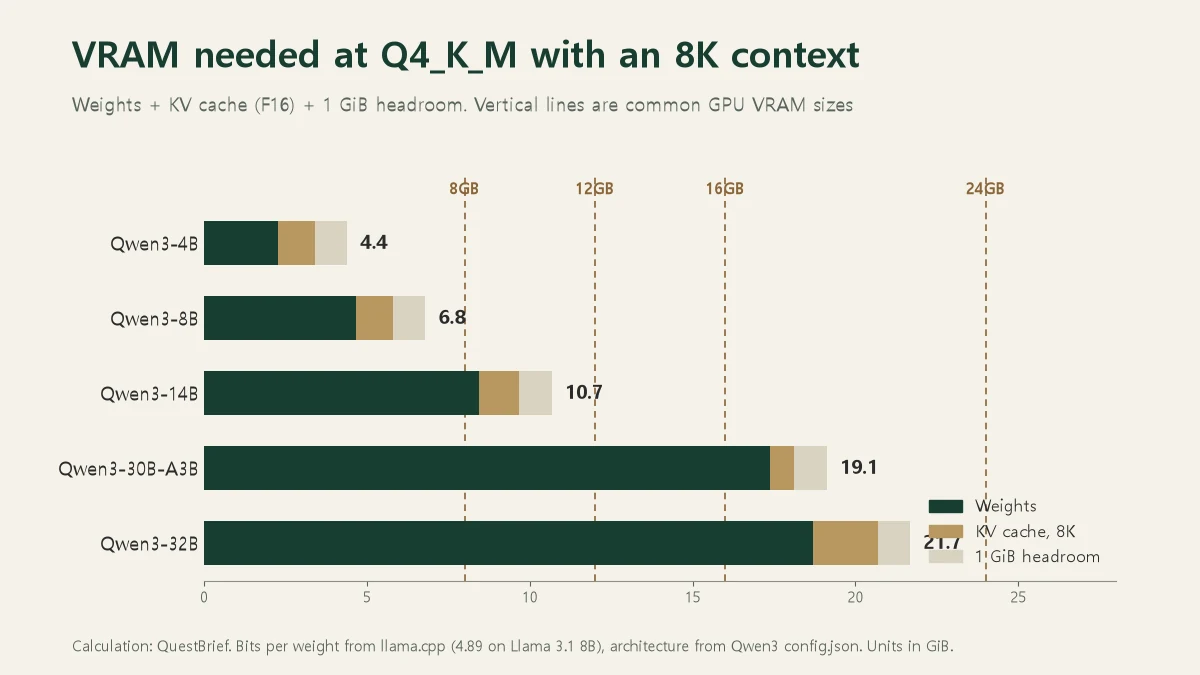
Chart: QuestBrief calculation
Add the three chunks and you get the chart above. Everything’s at Q4_K_M with an 8K context.
On an 8GB card, the 8B fits at 6.8GiB. Bump it to Q6_K and the weights alone are 6.3GiB, so you’re at 8.4GiB total and out of room. Stretching to a 32K context doesn’t work either, since that’s 4.5GiB of KV cache and 10.2GiB total. For 8GB, think of 8B at Q4_K_M as the ceiling.
On 12GB, the 14B fits at 10.7GiB, though there isn’t much left for a longer context. If you’d rather run the 8B, Q8_0 (8.1GiB) plus an 8K context fits comfortably.
16GB is where you start getting choices. The 14B at Q6_K comes to 11.3 + 1.25 + 1 = 13.6GiB. Or keep it at Q4_K_M and run a 32K context for 8.4 + 5.0 + 1 = 14.4GiB. Basically, you’re trading quality against context length.
On 24GB, the 32B at Q4_K_M fits at 21.7GiB. Go to 32K context, though, and the KV cache alone is 8GiB, pushing you to 27.7GiB. For long documents on a 32B you’d want to shrink the KV cache to q8_0 (llama.cpp’s -ctk and -ctv flags) or cut the context. The 30B-A3B, on the other hand, fits a 32K context in 17.4 + 3.0 + 1 = 21.4GiB.
Don’t trust the “3B” in an MoE name
The A3B in Qwen3-30B-A3B means about 3B parameters are active for each token. The model card says 3.3B of 30.5B total are activated, with 8 of 128 experts picked per token.
It’s tempting to think that means it’ll run like a 3B model. Memory-wise, it won’t. Hugging Face’s MoE explainer puts it plainly: only some parameters are used at inference, but “all parameters need to be loaded in RAM.” Compute follows the active parameters, while memory follows the total. That’s why the 30B-A3B sits right next to the 32B in the chart.
MoE models do give you one extra escape hatch. llama.cpp has --cpu-moe to keep all expert weights in system RAM, and --n-cpu-moe N to do that for just the first N layers. The shared weights and KV cache stay on the GPU, and the experts that only get called some of the time move off it. We didn’t find measured numbers on how much that slows things down in the sources we checked, so we’ll leave speed out of it.
GB and GiB aren’t the same
If your numbers come out slightly off, mixed units are usually why. Even llama.cpp’s own README lists the same Llama 3.1 file as “4.9 GB” in one table and “4.58 GiB” in another. A GiB is 2^30 bytes, about 7% more than a GB. Everything in this post is in GiB. If a download page lists sizes in GB, multiply by 0.93 to get GiB.
Next time a new model drops and you’re wondering if it’ll fit, open its config.json, grab num_hidden_layers, num_key_value_heads and head_dim, and check the parameter count on the model card. Those four numbers and two lines of math will tell you before you hit download.