If a lab ships its new flagship at exactly the same price as its current workhorse, should you just swap the model name in your config and move on? That’s the question Gemini 4 Carbon raises. Google launched it on November 10 at an introductory API rate of $2 per million input tokens and $10 per million output tokens, which Google’s own announcement calls “the same introductory price” as Gemini 4 Argon.
The answer is sitting in the same announcement. Google says Carbon is built to use more tokens than Argon. Same rate per token doesn’t mean same cost per task.
The token curve behind a matching rate card
Google positions Argon as “the ideal choice for the majority of software engineering and knowledge work.” Carbon is for tasks that test the limits of a model’s intelligence: complex multi-step coding and debugging, open-ended scientific research. To get there, Google says Carbon will “use more tokens than Argon to explore thoroughly, reason deeply, and run extended verification loops.”
Where those tokens land on your bill matters. The Google AI Studio pricing page labels the output row “Output price (including thinking tokens).” Short visible answer or not, everything the model reasons through internally is billed at the output rate.
Here’s a worked example. You send a 100,000-token bug-fix prompt. Argon finds the defect and returns a 2,000-token patch: $0.20 for input plus $0.02 for output, about $0.22. Now say Carbon takes the same prompt, runs its verification loops, burns 8,000 internal reasoning tokens, and returns the same 2,000-token patch. Your billable output is now 10,000 tokens and the request costs $0.30. To be clear, that 8,000 figure is our assumption for illustration; Google hasn’t published how many more tokens Carbon uses. Under that assumption, though, the per-token rate didn’t move and the per-task cost rose about 36 percent.
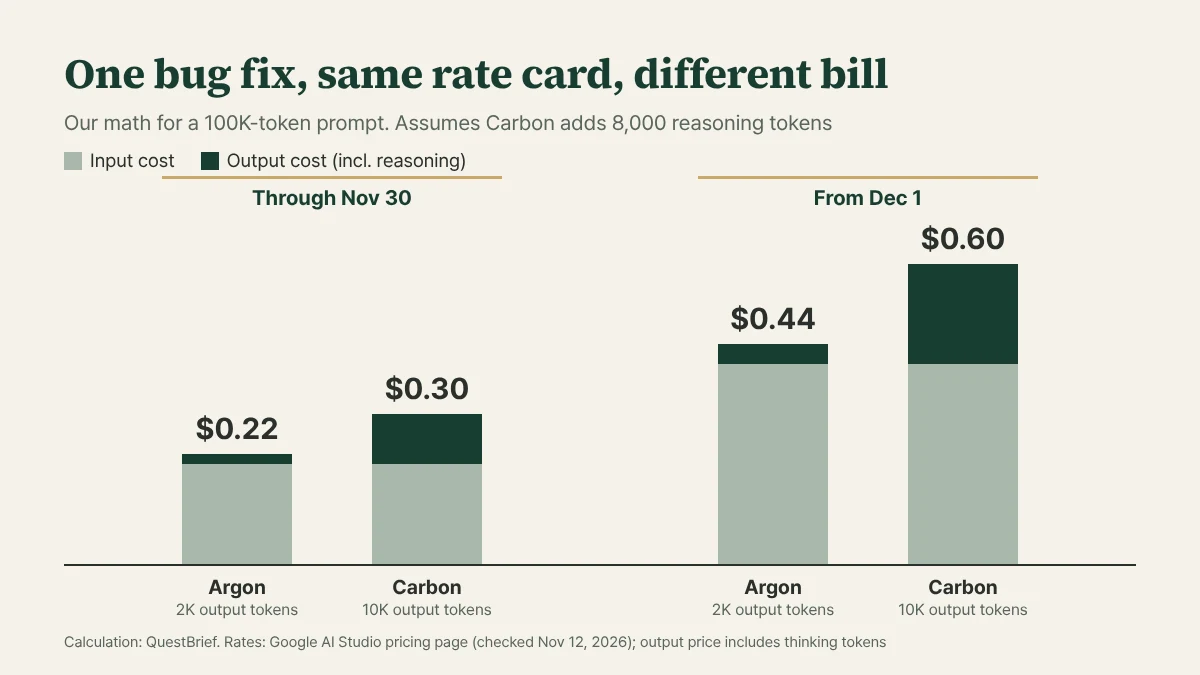
December makes the gap wider in dollars. Per the pricing page, both Carbon and Argon cost $2/$10 through November 30, 2026, then $4 input and $20 output starting December 1. Rerun the same example at December rates and Argon comes to $0.44 while Carbon hits $0.60. The ratio stays the same, but the per-task difference doubles from 8 cents to 16 cents, which adds up fast across thousands of calls.
The break-even point: 1.36 attempts
So when is paying 36 percent more actually the cheaper option? One Carbon call at $0.30 costs the same as about 1.36 Argon calls at $0.22 each. If Argon regularly gets a task wrong and you have to resend the request, Carbon wins once Argon’s average attempts per task go above 1.36. Put another way, if Argon needs a second try on roughly four out of ten tasks, Carbon is already cheaper. At December rates the math lands in the same place: $0.60 versus $0.44, still 1.36 attempts.
This rests on two assumptions: Carbon gets it right the first time, and each retry resends the full 100K-token prompt. It’s still a useful rule, because you probably already have the number you need. Your logs show how often Argon passes on the first try.
What /swarm does to the meter
Token use climbs fastest once you move from single prompts to /swarm, the new preview feature in Google Antigravity. It turns one prompt into a coordinated team of agents you can track in real time. In Google’s setup, Carbon takes the high-reasoning roles like architecture, coordination, and auditing, while lighter, faster models work in parallel isolated workspaces next to adversarial verifiers that try to break each change.
The demos are fun. One is an interactive Three.js exhibition of the Eiffel Tower’s 1887 to 1889 construction, built from a single prompt. Another is an open-world 3D game where you ride a GBike around Google’s Mountain View campus as a pelican.
If you’re paying per token, though, every agent in that team has its own meter running. Nobody has published a multiplier for how much more a swarm uses. According to The Neuron, “Google warns that parallel agents use quota much faster than a standard chat,” and the API rates above “are not a quote for running a swarm inside an Ultra subscription.”
Security is the other thing to weigh before you let a swarm loose. Google’s safety numbers look good on paper: Carbon “blocked 99% of attack trajectories” from Google’s adaptive red-teaming agent, and the per-attempt breach rate dropped to 0.8 percent from 3.1 percent on Argon. On a 375-task agentic honesty benchmark it passed 92 percent of tasks, versus 70 percent for Argon. But in the same section Google admits that “prompt injection robustness remains an area for continued improvement.” If your agents read untrusted web pages or repos, and you’re about to run several of them at once, that sentence deserves more weight than the 0.8 percent.
Read the benchmark baseline carefully
None of this means Carbon’s results are hype. It took first place on CursorBench 4.0, Perplexity’s WANDR, and Zapier’s AutomationBench, and second on the Multimodal Knowledge Agent (MKA) benchmark built with Artificial Analysis.
The cost claims need a closer read. On the first three, Google says Carbon came in at more than 2x lower cost per task than “the next best external model.” On MKA, it was more than 6x cheaper on average than the top-performing model. Those comparisons are against other companies’ models, not against Argon. They don’t tell you Carbon is cheaper than what you’re running today.
Most of Google’s showcase examples sit where a missed bug is expensive. On its internal Project Fortify benchmark, Carbon improved open-source recall by more than 25 percent relative to Argon. With Wiz, it found zero-days at two major SaaS providers in under two hours. And AlphaProof Code used it to generate millions of lines of Lean, proving key security properties of Signal’s protocol in weeks. Run those through the break-even math above and they’re exactly the tasks where Argon is likely to need several attempts, so Carbon’s higher per-call cost is easiest to justify there.
Picking Argon or Carbon per task
Two questions do most of the work: how many tries Argon takes on the task, and how much an undetected mistake would cost you.
For routine CRUD scaffolding, single-file edits, simple tests, or document summaries, defaulting to Carbon mostly buys you extra reasoning tokens you didn’t need. Argon handles that work, and Google itself keeps it as the default for most engineering tasks.
Big multi-package migrations, a failure you can’t trace across services, or a security and crypto code audit before launch are a different story. When the alternative is a senior engineer losing days to a regression, paying for extra verification tokens can easily be worth it.
Until November 30 the two models cost the same per token, which makes this the cheapest window you’ll get for a side-by-side test. Run a handful of your real tasks through both, then check your billing for the actual output-token ratio. That one number will tell you more about where Carbon belongs than any benchmark table.