Open any popular model’s GGUF page on Hugging Face and you’ll find a dozen files with names like Q8_0, Q6_K, Q5_K_M, Q4_K_M, IQ4_XS and Q3_K_S. Most people grab Q4_K_M because everyone else seems to. That’s a reasonable default. But once you know why it’s the default, you can sometimes fit a bigger model on the same GPU, or avoid a quant that quietly wrecks output quality.
Everything below comes from numbers llama.cpp publishes in its own repo. The two charts are our calculations from those tables.
Quantization means storing weights with fewer bits
A model is billions of numbers (weights). They’re usually trained and shipped at 16 or 32 bits each. llama.cpp’s quantize docs describe quantization as reducing that precision, for example from 32-bit floats to 4-bit integers, which shrinks the file and can speed up inference at the cost of some accuracy.
The size savings are big. The same docs list Llama 3.1 8B at 32.1 GB originally and 4.9 GB as Q4_K_M. The 70B model goes from 280.9 GB to 43.1 GB. That’s the difference between needing server hardware and fitting on a desktop with plenty of RAM.
Reading Q4_K_M one piece at a time
The names follow a pattern:
- The number after Q is the base bit width per weight. Q8 is 8-bit, Q4 is 4-bit.
- K means k-quants, the method merged into llama.cpp in June 2023. Weights are split into small blocks, and each block stores its own scale to keep errors down.
- S, M, L say how many of the sensitive layers are kept at higher precision. Bigger letter, bigger file, slightly better quality.
Hugging Face’s GGUF docs spell out the structure: Q4_K uses super-blocks of 8 blocks with 32 weights each, plus 6-bit scales and 6-bit minimums, which works out to 4.5 bits per weight. So “4-bit” really costs a bit more than 4 bits.
The M variant costs more still. According to the original k-quants PR (#1684), Q4_K_M keeps half of the attention.wv and feed_forward.w2 tensors at Q6_K and uses Q4_K for everything else. llama.cpp’s measurements on Llama 3.1 8B show 4.67 bits per weight for Q4_K_S and 4.89 for Q4_K_M. One caveat: the PR text dates from 2023, and Q4_K_S is described there as Q4_K for all tensors, yet it measures at 4.67 rather than 4.5. The exact mixes have probably been adjusted since.
Two more families you’ll run into. Names starting with IQ (IQ4_XS, IQ3_M and so on) use an importance matrix to decide which weights deserve more precision. Names like Q4_0 and Q5_1 are the older pre-k-quant formats, which Hugging Face’s docs label as legacy and “not used widely as of today.”
How much quality each step costs
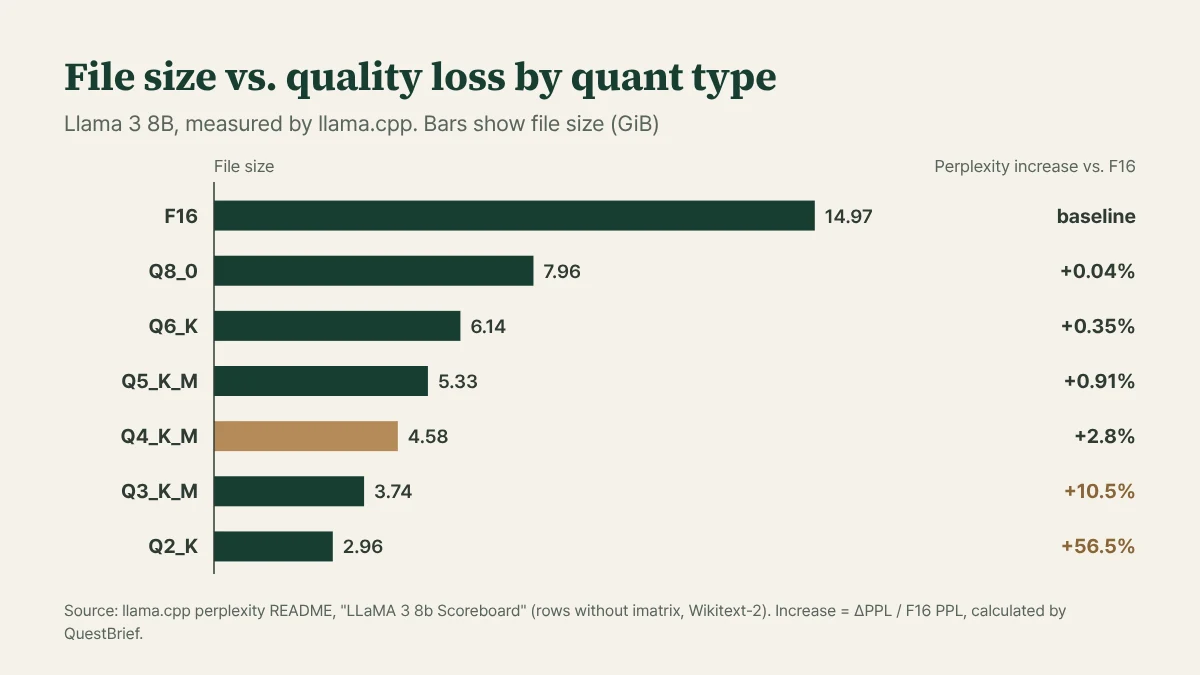
Chart: QuestBrief calculation from the llama.cpp perplexity README
llama.cpp’s perplexity README has a scoreboard for Llama 3 8B at every quant level. Perplexity (PPL) measures how well a model predicts the next token, and lower is better. On the right side of the chart, we’ve turned the table’s ΔPPL into a percentage of the F16 value so it’s easier to read.
Q8_0 halves the file and loses 0.04%, which is effectively nothing. Q6_K and Q5_K_M both stay under 1%. Q4_K_M is the first step where the loss shows up, at 2.8%. Then it falls off a cliff: 10.5% at Q3_K_M and 56.5% at Q2_K. Going from Q4_K_M to Q2_K saves only 1.6 GiB, but the quality loss is about 20 times larger.
The same README also tracks how often the quantized model picks the same top token as the original. Q8_0 matches 97.7% of the time, Q6_K 96.0%, Q4_K_M 91.9% and Q2_K 71.1%. That might be the more intuitive number: at Q4_K_M, roughly nine out of ten next-word picks are the same as full precision.
A few things to keep in mind with these tables. The README is explicit that perplexity is not comparable between different models. It’s for judging quantization loss within one model. The test text is Wikitext-2, not chat or code. And there’s a telling comparison in there: at Q4_K_M, Llama 2 7B’s perplexity rises 1.4%, while Llama 3 8B’s rises 2.8%. The README doesn’t explain why, but the same quant level can clearly hurt one model about twice as much as another. When you switch to a new model, it’s worth testing one level above whatever you used before.
Importance matrices help, too. In the same table, Q4_K_M’s ΔPPL is 0.175 without an imatrix and 0.151 with one. If a repo offers imatrix versions, there’s no downside to picking them.
For speed, the quantize README’s Llama 3.1 8B table shows text generation at about 29 tokens/s for F16, 51 for Q8_0 and 72 for Q4_K_M. The README doesn’t say what hardware that was, so treat it as a direction (smaller quants are usually faster) rather than a number to expect.
Will it fit? Why file size alone is misleading
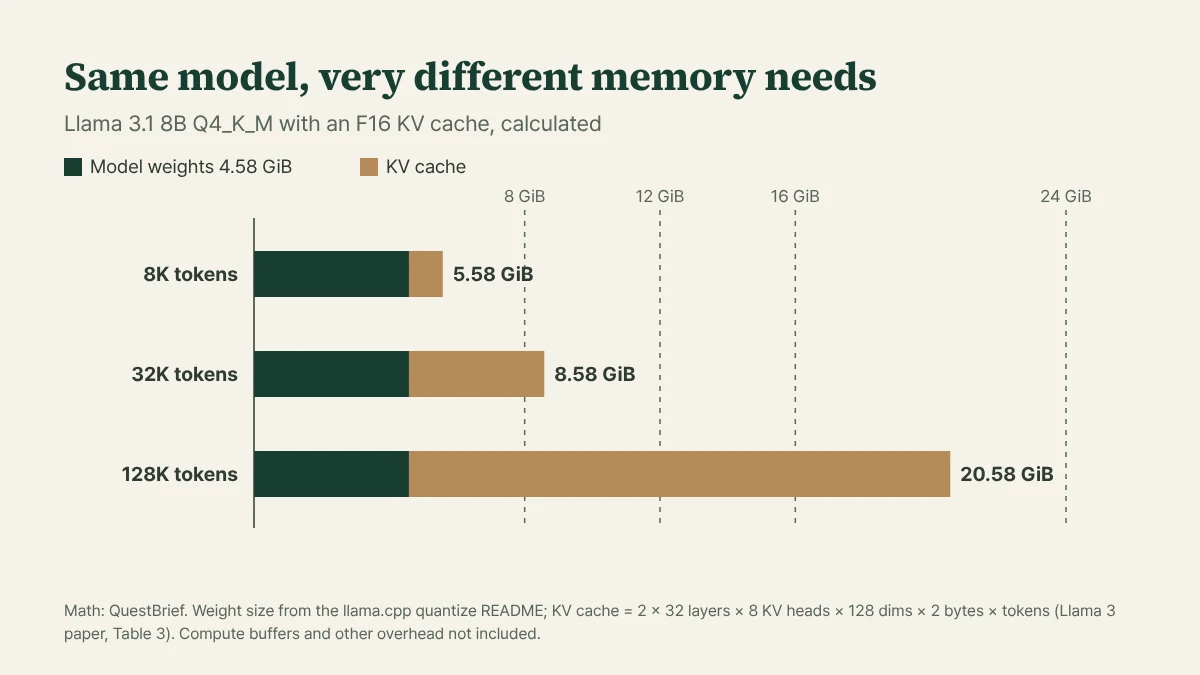
Chart: QuestBrief calculation
A 4.6 GiB file looks like an easy fit on an 8 GB card. But the KV cache needs its own memory. It’s where the model keeps what it has already read, and it grows with context length.
You can work out the KV cache from the model’s architecture. Here’s the math:
KV cache per token = 2 (K and V) × layers × KV heads × head dimension × 2 bytes (F16)
Table 3 of the Llama 3 paper lists the 8B model at 32 layers, model dimension 4,096, 32 attention heads and 8 KV heads. Head dimension is the model dimension divided by the head count, 4,096 / 32 = 128. That gives 2 × 32 × 8 × 128 × 2 = 131,072 bytes, or 128 KiB per token. At 8K (8,192) tokens that’s exactly 1 GiB. At 32K it’s 4 GiB, and at the full 128K context the paper says these models support, it’s 16 GiB.
So the same Q4_K_M file needs about 5.6 GiB for an 8K chat, which fits an 8 GB card, but more than 20 GiB at 128K, which is tight even on a 24 GB card. These numbers leave out compute buffers and other overhead, so real usage runs a little higher.
The 70B model scales up fast. With 80 layers and 8 KV heads, it’s 320 KiB per token, so 2.5 GiB for just 8K tokens, on top of 43.1 GB of weights. There’s no fitting all of that on a single 24 GB card.
Knobs to turn when you run out of memory
The llama.cpp server README documents the options that matter most here:
-c(--ctx-size) sets the context length. The default of 0 loads the value from the model, which for a long-context model can mean a huge KV cache. Setting something like 8192 yourself is the safer move.-ctkand-ctvset the KV cache data type. The default is f16, and options include q8_0 and q4_0. Since q8_0 stores a bit over 8 bits per value, it’s roughly half the size of f16.-ngl(--n-gpu-layers) sets how many layers go in VRAM. If the model doesn’t fit, you can keep some layers on the GPU and run the rest from system RAM, at a speed cost.
None of the sources we read measure how much a quantized KV cache hurts quality, so we’re only making a claim about size here.
Start at Q4_K_M and move up or down
The process is simple. Find the largest model where weights plus the KV cache for the context you actually use, plus about 1 GiB of headroom, fit in your VRAM. Start with its Q4_K_M. If there’s memory left, step up to Q5_K_M or Q6_K. If it doesn’t fit, cut the context or switch the KV cache to q8_0.
Be careful going below Q3. In the table above, the 8B model already loses more than 10% at Q3_K_M. If a model only fits at Q2, download the Q4_K_M of the next size down as well and compare them on your own prompts. This data was measured within a single model, so it can’t tell you whether a big model at Q2 beats a smaller one at Q4.