pixelfx is an open-source project on GitHub with 244 pixel art effects and a Claude Code skill for making new ones. As of November 4 it had more than 4,400 stars.
This isn’t an overview; it’s a hands-on review. QuestBrief’s operator put pixelfx into a 2D pixel dungeon RPG they’re developing, working from October 31 to November 3. The operator set the direction and Claude Code wrote the code. Every game screenshot here was captured during that work. QuestBrief has no affiliation with the pixelfx authors.
What pixelfx is
From the README and the skill description:
- One effect, one code file. No image files: every frame is drawn in code, pixel by pixel, across 21 categories including fire, explosions, ice, lightning, holy, shadow, weather, UI, and screen transitions.
- Recolor without editing code. Pass a
palette(a dark-to-bright list of colors) and the same fire burns blue. - Light is computed separately. A color buffer and an additive light buffer mean even glow lands on the pixel grid.
- Seeded randomness. A given frame always renders the same way.
- Works with any engine. Browser games can use the code directly; engines like Godot and Unity can use exported sprite sheets (PNG plus JSON).
- The Claude Code skill teaches a method. Draft, render, look at it, fix the worst thing, repeat. The project credits the approach to Sprite Fusion’s Hugo Duprez.
It’s MIT licensed, commercial use included. Per NOTICE.md, parts adapted from Hugo Duprez’s and Hollow Crown’s code carry their own attribution, and the Patch Pixel font used in the gallery isn’t covered by the MIT license.
Step 1: side by side with the existing effects
Before touching the game, we rendered the game’s existing effects and pixelfx’s next to the game’s actual monster sprite.
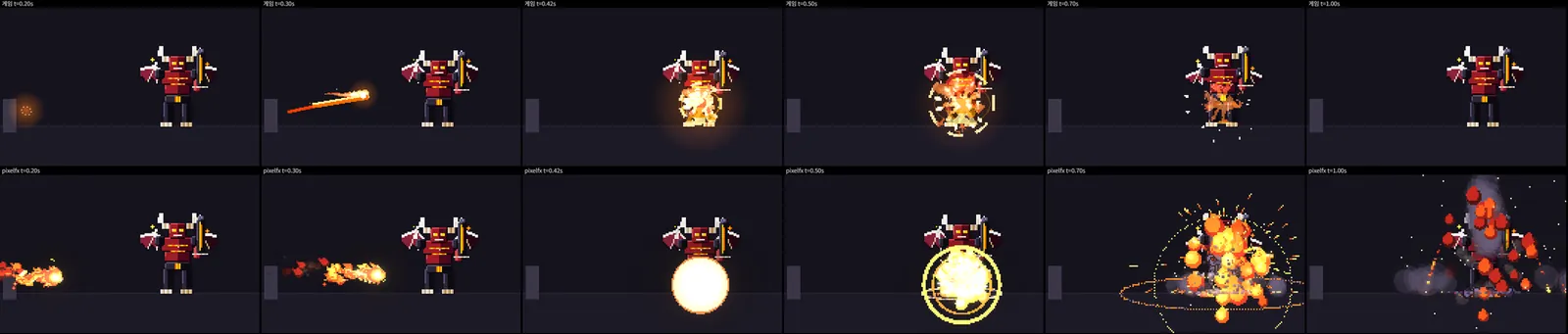
Top: original flame lance / Bottom: pixelfx fireball and explosion. Image: QuestBrief operator’s development build; effects from pixelfx (MIT)
The difference was obvious. The operator’s first reaction, roughly translated: “the graphics get so much better.” The flame lance gained real weight, with a solid fireball and explosion replacing thin lines and a soft glow.
Pixel density lined up, too. The game draws each monster pixel at 2.6× on screen. The free effect pack it used before was drawn at about 3.4×, so its pixels looked chunkier than the monsters’. Drawing pixelfx sheets at 2.6× matched the monsters’ pixels exactly.
Three reasons we couldn’t use the sheets as-is
-
They were too long. Skills in this game finish in 0.5 to 0.75 seconds. pixelfx’s small-explosion runs 5.4 seconds including smoke, frost-nova 3.4 seconds, and lightning-strike spends about 0.9 seconds on the ground marker before the bolt even falls. With 2× and 4× battle speeds, that’s worse. We kept only the part from impact onward; the explosion uses its first 0.6 seconds and fades out.
Left: the full 5.4-second original / Right: the first 0.6 seconds used in game. Image: QuestBrief operator’s development build; effects from pixelfx (MIT)
-
The reference size was different. pixelfx is drawn around a 24×38 stock character, while the game’s monsters are 64 pixels tall. Explosions and frost rings overflowed the frame, and a snowflake effect burst above the target’s head.
-
The colors didn’t match. pixelfx lightning is blue; the game’s is yellow. Re-exporting with the game’s colors in
palettefixes that, without touching a line of code.
One fire effect, re-exported with three palettes. Image: pixelfx (MIT) effect rendered on the operator’s PC
Step 2: what broke once it was in the game
We started with two skills: the basic attack and the flame lance.
The explosion was far bigger than small monsters like the slime, and the basic attack flash floated in the air above the slime’s head. That wasn’t pixelfx’s fault: the game drew every effect at the same spot, sized for a skeleton.
Measuring each monster’s body showed how far off that was: skeleton 150, golem 133, slime 73, bat 68, the large lord 226. So the engine now measures the actual outline of each monster’s sprite and positions and sizes effects to match.
Left: before body fitting / Right: after (0.5× speed). Image: QuestBrief operator’s development build; effects from pixelfx (MIT)
One lesson: scaling effects in direct proportion to body size made them so small on the slime that hits lost their punch. Scaling more gently worked better: a monster half as tall gets effects at 0.65×. Because this lives in one place, it applied to all 26 skills at once.
Step 3: from using effects to making them
So far we had only used effects that ship with pixelfx. Then the operator asked: “Can’t it make something new and original, beyond what’s already there?”
It can. pixelfx is less a finished collection than a toolkit for making effects. In this project, Claude Code cloned the pixelfx repo and used its authoring guide (docs/AUTHORING.md) and tools directly, the same loop the skill teaches:
- Write a new effect file.
- Render it and look at the contact sheet.
- Fix the most glaring problem and render again.
- Run the checker (
check.mjs) for spills outside the canvas, unseeded randomness, and similar issues. - Export a sheet and add it to the game’s atlas.
The first experiment was a hit effect for the ice skill “Frost Spike.”
When the spike lands, a white flash pops and 17 ice needles of different sizes bloom outward, then shatter. It took three rounds of render, look, fix. The first draft’s needles looked like thin white sticks, so they got thicker with shaded faces. A grey smoke smudge looked messy and was removed. The length was cut to one second for a snappier hit.
Left: draft / Right: final. Image: QuestBrief operator’s development build; effects from pixelfx (MIT)
Here’s how it looks in the game. The old effect was a soft white glow; now ice needles burst out and shatter.
Left: old / Right: the new original effect (zoomed, half speed). Image: QuestBrief operator’s development build; effects from pixelfx (MIT)
From then on, each time the operator said “next batch,” three to six more effects got made. All remaining skills were converted on November 3, leaving 23 skills using original effects.
“Guard Break” from the final batch. Left: old / Right: the new original effect (zoomed, half speed). Image: QuestBrief operator’s development build; effects from pixelfx (MIT)
Problems that kept coming back
Making many effects surfaced the same problems repeatedly. If you plan to author pixelfx effects, these are worth knowing:
-
Translucent fades turn into checkerboards. pixelfx renders translucency with dithering (alternating pixels), so large fading surfaces looked like a checkerboard. Ice shards, golden blades, and prism panes all hit this. Drawing solid faces that shrink away instead of fading fixed it.
Left: the first draft’s checkerboard / Right: the final version with solid faces. Image: QuestBrief operator’s development build; effects from pixelfx (MIT)
-
First drafts are often the wrong size. A grave-sigil effect started out 2.5× larger than the game’s summoning circle, while the poison effect read as the smallest and weakest of its batch in game. Checking in the actual game, not just on the rendered sheet, was essential.
-
The file keeps growing. The game ships as a single HTML file with every effect frame packed into one atlas. The atlas grew from 228 KB to 616 KB, and the test limit was raised twice, from 320 KB to 448 KB to 640 KB. Removing replaced effects along the way slowed the growth.
-
There’s a color limit. The atlas is saved as a 256-color palette, so colorful pixelfx effects can subtly shift other effects’ colors. No visible difference showed up this time, but adding many more effects could require a different storage format.
Verdict
What worked
- A clear jump in quality. Comparing in the same game scene made the difference obvious.
- Effects are code, so colors, counts, and speeds are just numbers to change. That suits an AI agent’s render-look-fix loop well.
- The sprite sheet format is standard; adding it to the existing atlas build took little more than one new source.
- The checker catches problems people easily miss.
What didn’t
- Stock effects may not match your game’s timing or scale. For fast combat with hits around half a second, trimming is close to mandatory.
- Dither-based translucency means big fade-outs need special care.
- Above all, your game’s own structure has to support it. The most work in this project wasn’t pixelfx; it was game code to place effects according to each monster’s size.
Who it’s for
- Anyone making a pixel art game in a browser or 2D engine who wants better skill and hit effects
- Developers who want to try graphics work with an AI coding tool like Claude Code
- People willing to go beyond the stock effects and author ones that fit their own game
In the end, this was less about borrowing effects than learning how to make them. You can use the 244 effects as they are, but pixelfx’s real value is a workflow that keeps producing effects sized and timed for your own game.